
Before you read: the UK
Luckyspy's Terms and Conditions (clauses 1.3 and 4.1) list The UK among prohibited jurisdictions. A resident of the UK is not allowed to register or play there, and the operator can close such an account.
Everything below describes what the brand publishes. It is not advice to sign up from the UK. See the UK status page for the details and the British law.
On this page
- Get the Luckyspy App Running on Your Phone in Minutes
- Luckyspy App vs Mobile Browser: What Changes on a Phone
- Claiming the Luckyspy Welcome Offer From Your Phone
- Logging In and Using One Account Across Devices
- Safety Checks for UK Players Using the Luckyspy App
- Staying in Control: Limits and Self-Exclusion on Mobile
- Questions and answers
Playing Luckyspy on a phone doesn't need third-party files. This 2026 guide looks at the app-style route, the mobile browser, logging in, and how the mobile account matches desktop, for UK players 18 and over.
Get the Luckyspy App Running on Your Phone in Minutes
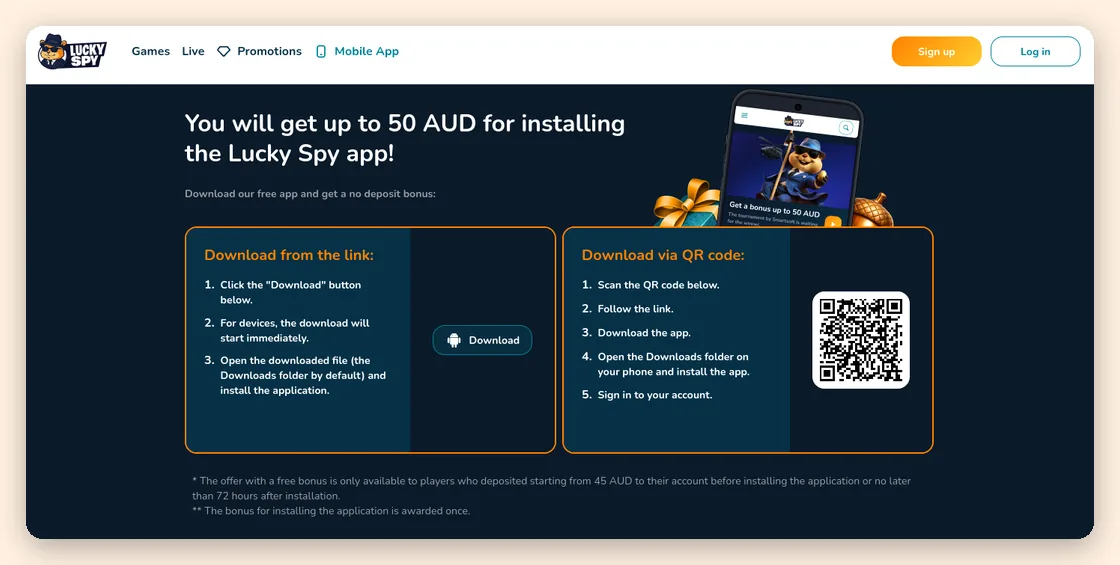
Getting the Luckyspy app begins on the brand's own website rather than anywhere else: Android devices can grab a downloadable install file via the Download button or by scanning a QR code, while an iPhone or iPad instead saves a home-screen shortcut through the browser's menu. Because neither path pulls a file in from an unofficial third-party source, this works well for UK players wary of risky downloads.
- Open your phone's browser and type the official Luckyspy address manually, or use a bookmark you made yourself.
- Register or log in with your existing account details.
- On Android, grabbing the installer works either via the Download button on the site or by running a scan of the QR code; iPhone and iPad users, instead, add a home-screen shortcut to the site through the browser menu.
- Launch Luckyspy from the installed app or home screen icon whenever you want to play.
- Deposit limits should be set inside the account area before the first session.
Sticking exclusively to the official website is the safer approach. Files offered through unofficial pages, messaging apps or sponsored search listings may have been altered, which could put login details and financial information at risk. Only those aged 18 and over are permitted to gamble, and actual money is genuinely at stake.
Luckyspy App vs Mobile Browser: What Changes on a Phone
Whether opened through the Luckyspy app-style shortcut or the mobile browser, the same account loads on either a phone or a tablet. Updates and convenience are what differ, not the games on offer or how balances work.
| Aspect | App / shortcut | Mobile browser | Desktop |
|---|---|---|---|
| Access | One tap from the home screen | Type the address or use a bookmark | Full browser window |
| Devices | Phone and tablet | Phone and tablet | Laptop or PC |
| Updates | Handled automatically by the site | Handled automatically by the site | Handled automatically by the site |
| Account and balance | Same account as desktop | Same account as desktop | Same account |
| Screen layout | Touch-first, compact | Touch-first, compact | Wider, more content at once |
Because a shortcut simply opens the site, updates need no manual installation. That is the main trade-off: you gain speed of access but get no extra features beyond the browser version. Screen size is the practical difference, as desktop shows more at once. Exact feature availability is listed in the account area.
Claiming the Luckyspy Welcome Offer From Your Phone
Luckyspy advertises a welcome package worth up to 400% + 350FS on an initial deposit; the complete terms aren't made public and surface only within the account area. Claiming it requires a deposit — no free version exists — and it can be accessed from a phone just as easily as from a desktop.
Claiming this from a phone or tablet means logging into the account, heading to the cashier and making the qualifying deposit described in the account area. It's worth checking the promotions page beforehand, since some offers must be selected or confirmed prior to depositing.
Reviewing the wagering rules before taking any offer is worthwhile — they appear within the cashier or on the promotions page, as terms vary between promotions. These set out how the bonus amount and any spin winnings are to be used, and eventually paid out. Only sums that are comfortable to lose should be deposited, since a bonus doesn't reduce that risk. Only players 18 or older may take part.
Logging In and Using One Account Across Devices
Luckyspy uses a single account on phone, tablet and desktop. New players register once, then log in with the same details on any device, so balance and account settings stay the same.
Registering from a phone means visiting the official site, selecting sign-up and filling the form with correct personal details. Accuracy matters here, since this information can be checked during verification before a withdrawal.
When a password can't be recalled, the login page's reset link starts the process — follow the guidance emailed to the address used at registration. Pick a password not used anywhere else and stay off shared or public devices when signing in.
Should issues arise with an account or with access, the Luckyspy site's help section lists the contact options available. Login information should never be handed over to anyone claiming to be offering assistance.
Safety Checks for UK Players Using the Luckyspy App
On its mobile site, Luckyspy relies on SSL encryption to protect data as it travels, KYC verification to establish a registrant's identity and age, and RNG-based mechanics for determining game results. According to the operator's own terms, the UK sits among the territories barred from signing up, and no UK Gambling Commission licence covers the site.
SSL scrambles data passing from a phone to the site. A padlock icon in the browser's address bar signals, at a basic level, that it's active — worth a glance especially when using public Wi-Fi.
KYC checks involve requesting identity and address paperwork, typically ahead of a first withdrawal. Underage play and fraud are what this guards against, so accurate details upfront mean fewer delays.
RNG technology generates game results at random, meaning outcomes can neither be foreseen nor swayed by the player.
Before depositing, check these points:
- The site footer cites licence No. ALSI-202509039-FI1 from the Government of the Autonomous Island of Anjouan, not a UK Gambling Commission licence.
- Make sure the address in your browser is the official one.
- Read the terms for bonuses and withdrawals.
- Use a strong, unique password.
Staying in Control: Limits and Self-Exclusion on Mobile
Luckyspy provides deposit limits and self-exclusion, restricting play to adults aged 18+. Such tools give UK players a way to cap spending, and work best switched on before a session starts.
Deposit limits cap the money added into an account across a set period. Setting one up beforehand is better than deciding mid-session.
Self-exclusion cuts off account access for a chosen stretch of time, and turning to it makes sense once gambling no longer feels like entertainment.
Funds put into gambling can genuinely disappear for good, so it shouldn't be treated as income. Set a spending ceiling and a time limit beforehand, and stop the instant an urge appears to chase back losses.
GamCare is a UK charity, independent of any operator, giving free and confidential advice. Its website explains how to get in touch.
Questions and answers
Is the Luckyspy welcome offer available if I only play on a phone?
Yes, it does work that way. Tied to the account rather than to any single device, Luckyspy's welcome offer — advertised as up to 400% + 350FS on an initial deposit — works identically from a phone, a tablet or a computer. The exact terms, including the smallest qualifying deposit, are revealed only after signing into the account, and no no-deposit version of this promotion exists. Before adding funds, players might want to check the promotions page — the offer sometimes needs manual activation first — and then look over the wagering requirements set out in the cashier.
Why might KYC verification delay my first Luckyspy withdrawal?
A first withdrawal typically triggers KYC checks, and holdups usually stem from information that doesn't match submitted documents, or from identity and address files that lack clarity. This step delays that initial payout but exists to guard against fraud and underage play. Signing up with correct personal information, and having identity and address paperwork ready, cuts the odds of further requests. The cashier shows current processing times.
What should I do if the Luckyspy site looks different or asks for unusual details on my phone?
Stop and check the address in your browser first, since a copycat page can look similar to the real one. Confirm it is the official Luckyspy address you typed manually or saved as your own bookmark, and look for the padlock symbol that shows SSL is active. Do not enter login or payment details on pages reached through messengers or search ads. For genuine access problems, use the contact routes in the help section of the official site.
Is it risky to use Luckyspy on public Wi-Fi?
A public connection brings more risk here than a private one. SSL encryption shields data in motion, shown active by a padlock icon near the browser's address bar, though shared devices and open networks still carry separate dangers. It's best to avoid signing in from a public or shared device, to use a strong password unique to this account, and to keep real deposits for a safe connection. Switching on deposit limits in the account area adds extra safety.
How do I set deposit limits or self-exclude on Luckyspy from my phone?
Deposit limits and self-exclusion are both managed from the account area, behaving identically whether it's a handset, a tablet or a desktop in use. A deposit limit caps how much can be added within a period the player sets, whereas self-exclusion blocks the account for a duration decided beforehand. Sorting these out ahead of a first session works better than deciding partway through. Should gambling stop feeling like entertainment, free and confidential help is available through GamCare. Players must be 18 or older.
Continue reading
- Slots and gamesStudios, demo mode and bonus exclusions.
- Live casinoLive tables and how bonus rules treat them.
- PaymentsWhat the open pages say about deposits and the cashier.
- WithdrawalsTurnover rule, timings, caps and fees.
- Battles and prize drawsDaily, weekly and monthly battles and prize draws.
- Customer supportContact routes and how complaints work.
Where these facts come from
- Luckyspy Terms and Conditions, Account/Payouts/Bonuses rules and KYC policy (luckyspy.com, read 25 November 2026)
- Luckyspy promotions, app, FAQ and lobby pages (luckyspy.com, read 25 November 2026)
- Luckyspy site footer with the operator and licence statement (luckyspy.com, 25 November 2026)
Checked by the luckyspyy.uk editorial team on 25 November 2026. See how we review.